-
Written By Amit Chandel
-
Updated on October 30th, 2025
How to Transfer AOL Email to iCloud Mail Account Directly?
Summary: Nowadays, users prefer cloud services over webmail services. Therefore, users want to transfer AOL email to iCloud mail. Are you one of them too? Read the blog to learn about manual methods for moving AOL emails or using the AOL Mail Converter. You can then migrate your emails instantly and securely. Let’s begin with understanding about these emails and their needs first.
American Online(AOL) is one of the most popular webmail portals and online service providers. It has sustained in the US market for a long time and is preferred by users. However, frequent shifts in AOL are not very favorable. Whereas, iCloud is a cloud storage provided by Apple. It provides large storage space and is common among Mac users.
Reasons to Transfer Emails from AOL to iCloud
There are various significant causes why users feel the need to transfer AOL email to iCloud Mail. Some of these are mentioned below:
- As a Mac user, you can access emails offline easily after the transfer.
- You can also keep a backup of your data to avoid data loss.
- Also, your server space can be freed up when you move emails.
- Moreover, iCloud can easily synchronize across different Apple devices.
- iCloud also offers more security and privacy for your emails than AOL.
Because of these benefits, users move mail from AOL to iCloud. Further, we will find out how to transfer AOL emails with ease.
How to Migrate AOL Emails to iCloud?
Migrating emails from one webmail to a cloud platform seems like a tricky task. However, it is quite simple and convenient if you follow a step-by-step procedure. iCloud offers a range of advanced features like offline tracking, storage, media sync, and others. Therefore, it is a great choice to migrate AOL email data. There are two ways to migrate:
- Manual Approach
- Professional Tool
The detailed explanation for both methods is discussed below.
Method 1: Move AOL Emails to iCloud with a Manual Approach
The cost-free manual approach involves two stages. These are as follows:
Stage 1: Save AOL email as a PDF
Follow the steps below to change AOL email into PDF:
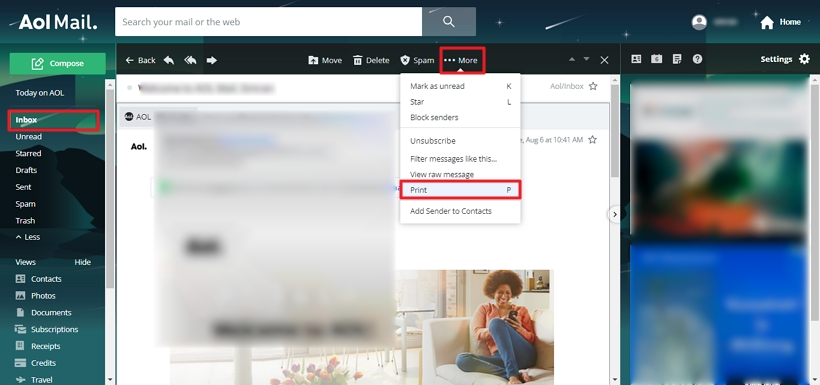
- Log in to an AOL email account with your credentials.
- Now, open the email from the inbox that you want to migrate. Click on More > Print.
- A Print Preview dialog box will appear. Set the destination as Microsoft Print to PDF.
- After that, choose the pages, layout, color, and other settings as required and hit the Print button.
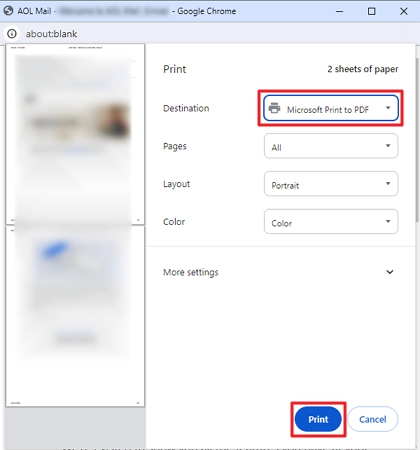
- Further, enter a name and specify the destination for your file. Finally, click the Save button.
Stage 2: Importing the PDF to an iCloud Email Account
Now, after converting AOL emails to PDF, move them to Mac by these steps:
- Locate and open the converted PDF into a web browser or Mac application
- Then, select Export, find the Save to Files option, and click it.
- Subsequently, select the desired location in iCloud and click Add.
- It will migrate AOL emails to your iCloud Account.
Another way to directly transfer AOL email to iCloud Mail manually is as follows:
- Sign into an AOL Mail account with your credentials.
- Go to the Mail settings option from the top right corner.
- Further, select the General Settings and click the forwarding option.
- After that, select “Forward a Copy of Incoming Mail to:”.
- Enter your iCloud account address and click Save Settings.
The manual method is simple but it doesn’t allow bulk transfer of AOL Emails. Moreover, it is not secure and has other restrictions as well. In addition, when you can’t sign into AOL mail, these steps won’t be helpful. In such a case, using a more professional method is favorable.
Method 2: Automated Tool to Transfer AOL Email to iCloud Mail
The AOL Mail Backup Tool is a flexible and seamless solution for transferring your AOL emails to iCloud or other platforms. It keeps your emails intact and secure while migration. Additionally, it reduces the process to a few steps and is very easy and intuitive.
Some of its key features are:
- Allows bulk migration of AOL emails and is very compatible with systems.
- Offers advanced options to remove duplicate emails, maintain folder hierarchy, and more.
- Transfer AOL Email to Gmail, Outlook, PST, MBOX, and other file formats and email clients.
- You can also choose to migrate emails and other data selectively as per dates.
Steps to Move AOL Emails to iCloud
- Download and install the tool on your system. Run it.
- Sign into your AOL email account with your credentials.
- Then, expand the tree hierarchy to view all your AOL files and folders.
- Select the necessary files to backup and click Next.
- Choose the iCloud email client to transfer your AOL emails.
- Sign into your account. Furthermore, select additional filters if required.
- Next, provide a name for your folder and specify the destination path.
- Lastly, hit the Convert button to migrate AOL emails to iCloud.
Conclusion
Overall, the subject to transfer AOL email to iCloud mail has become general nowadays. For the sake of keeping files accessible and secure, iCloud is preferable. In this write-up, we have explained the manual method to migrate your emails. However, it has some shortcomings. Therefore, we also suggested a professional tool to back up your emails for a longer period. You can choose either of the two methods as per your preference for migration.
Frequently Asked Questions(FAQs)
Q. How to transfer AOL emails to my hard drive?
Ans: To transfer your emails to the hard drive, follow these steps:
1. Download the AOL Mail Backup Tool on your system and run it.
2. Log in to your AOL email account with your username and app password.
3. Next, expand the tree structure and view your AOL files and folders. Select files and click Next.
4. Choose PDF as the file-saving format. Apply additional filters as needed. Specify the hard drive path in the destination column.
5. Finally, hit Convert.
Q. Can I Import my AOL Contacts to an iCloud Account?
Ans: Yes, using the AOL Mail Backup Tool, you can import your contacts to the iCloud account in seconds. It will allow bulk transfer of your contacts. Also, it backs up your mailbox items, notes, calendars, etc. easily and quickly. Moreover, it is a secure and reliable software.
About The Author:

Meet Amit, an experienced SEO expert and content planner. He uses his creativity and strategy to create content that grabs attention and helps brands reach their goals. With solid skills in digital marketing and content planning, Amit helps businesses succeed online.
Related Post