-
Written By Vikas Bajpai
-
Updated on May 6th, 2026
Fix Corrupt MBOX File Without Losing Emails (2026 Guide)
If you work with Thunderbird, Apple Mail, or other email clients that store data in .mbox files, you may one day see an error like “file corrupted” or “cannot open mailbox.” When MBOX files get corrupted, users can lose access to large volumes of critical email data. Trying to fix them by hand usually falls short or limits you to a single mailbox. Hence, a stable conversion workflow is essential to fix corrupt MBOX files effectively. The MailConverterTools MBOX Converter Tool helps scan and backup files into your desired formats with forensic precision.
User query: A mid‑sized legal firm lost access to hundreds of MBOX files after a sudden NAS failure. Thunderbird refused most of them, and the rest opened with missing threads and attachments. They urgently needed to fix MBOX file not opening issue before a critical audit deadline.
What Causes MBOX Corruption?
- A sudden power cut or system crash while Thunderbird writes to the mailbox can damage the MBOX file.
- Bad sectors or failing disks often leave the file partially or fully unreadable.
- Very large MBOX files near the client’s size limit handle changes less reliably and break more easily.
- Malware or aggressive antivirus tools can overwrite or truncate parts of the mailbox by mistake.
- Incorrect file permissions or unsafe third‑party plugins can also cause hidden corruption over time.
How to Diagnose a Corrupted MBOX file?
- Note if the file size changes oddly after a crash or reboot.
- Test in another client and watch for large gaps in the message list.
- Watch for repeated “corrupt folder” or “unreadable mailbox” prompts in the client log or UI.
- Scan the file in a text editor and note gaps in the From block structure or strange encoding.
- If the client locks up or repeatedly fails to load the mailbox, assume structural corruption.
Manual Paths to Recover Emails From MBOX File
You can try to repair a corrupted MBOX file by using straightforward options inside the email client. This approach combines troubleshooting with basic folder‑handling features. It is most useful for minor issues where the file is still partly readable, not for deep or full‑blown corruption.
Follow The Process Below To Fix Corrupt MBOX File:
- First, open your email client and locate the MBOX file inside its default profile directory.
- As a next step, change the name of the corrupted file to mailbox.mbox.old or a similar backup name.
- From there, quit the email client and launch it again so it creates a new, clean mailbox with the original name.
- Then, go to the Import or Import mail menu and select the renamed MBOX file to restore its contents.
- Lastly, if available, trigger a folder‑index rebuild or mailbox compaction to finalize the repair.
How to Repair Corrupt MBOX File Using Thunderbird?
If your MBOX file is not opening or emails are missing, Thunderbird offers a built‑in way to repair the mailbox instead of relying on external tools. This method works well when the problem is mainly with the folder index and not with the actual email data itself. This is a simple way to attempt to fix corrupt MBOX file issues in Mozilla.
Steps
- Open Thunderbird and go to the mailbox folder that is causing the issue.
- Then, right‑click on the affected folder to open the context menu.
- Next, select Properties from the list to view folder settings.
- After that, click the Repair Folder button to start the repair process.
- Finally, give it a moment to rebuild the index, and then check if the emails are back.
In many cases, the MBOX file is fine, but the index is broken. This method rebuilds the index only, leaving emails untouched, and works best for light corruption.
Does Folder Compaction Fix MBOX File Corruption?
If your MBOX file will not open properly or acts strangely, try compacting the folder in Thunderbird to restore your emails. This works best when the mailbox has grown large with deleted messages or has slowed down over time.
Follow these steps:
- Start by opening Mozilla Thunderbird and going to the mailbox folder that is acting up.
- Next, right‑click that folder to open the options menu.
- Then, choose Compact or Compact Folder from the list.
- After that, let Thunderbird clear the unused space and reorganize the mailbox for a few moments.
- Finally, open the folder again and see if your emails appear normally.
Over time, deleted messages stay in the MBOX and make the file larger. Compacting clears these hidden entries and fixes minor issues. It helps with performance and light corruption, but cannot repair badly broken MBOX files.
What Are The Real Limits Of Manual MBOX Repair?
- Manual fixes work only on lightly damaged MBOX files that still open in the client.
- They cannot recover data if the file structure is deeply broken or if the file will not open at all.
- Text‑based editing is slow and error‑prone, especially for large or complex mailboxes.
- Thunderbird index repair and compaction often fail on oversized or heavily corrupted files.
- These methods cannot restore emails lost due to disk errors or incomplete backups.
Real Case Story: How the Firm Recovered Its Data
An unexpected NAS storage failure wiped the firm’s server configuration and left hundreds of corrupted MBOX files. Manual repairs failed and showed errors, being unable to fix the issue. Thankfully, they already had a backup with the MailConverterTools MBOX Converter Tool. Every mailbox recovered fully with intact folder structure and attachments, saving three years of critical business data just in time for the audit.
Backup MBOX Before You Get Stuck With Corruption!
Corrupt MBOX files carry business-critical data that enterprises simply cannot afford to lose. The MailConverterTools MBOX Converter Tool was built for exactly this situation. It reads MBOX files with precision and delivers every email completely intact. The utility can also convert MBOX to Courier Mail and other email clients. So, basically, you can secure your entire MBOX dataset in another format or a mail server before it becomes inaccessible due to corruption.
Steps to Operate The Tool:
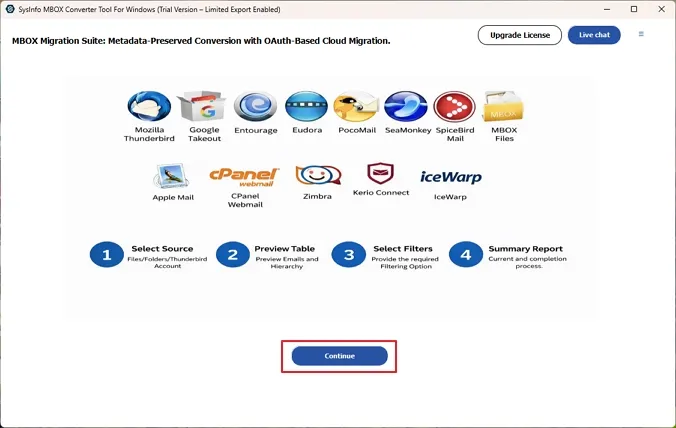
- At first, download and launch the MBOX Converter tool on your system as an administrator. Hit Continue.
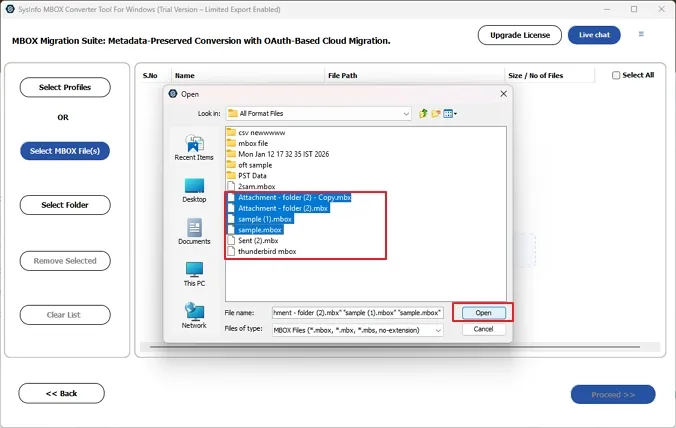
- After that, choose from Select MBOX Files or Select Folder and add your MBOX files to the tool.
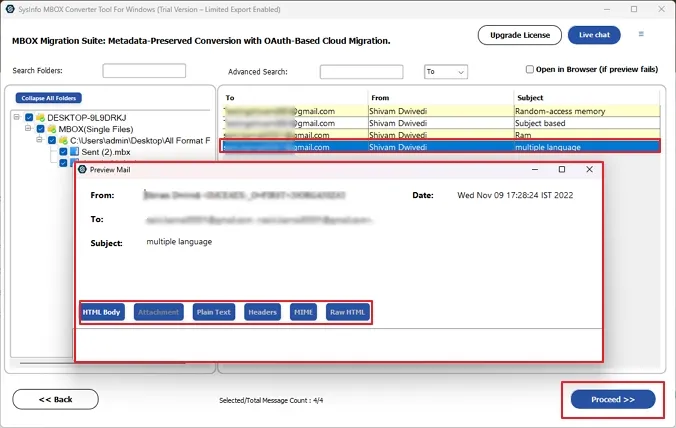
- Next, you can preview the email content of the MBOX files and select folders from the tree to fix the files.
- Now, select MBOX in the Export File Format option to get your resultant file.
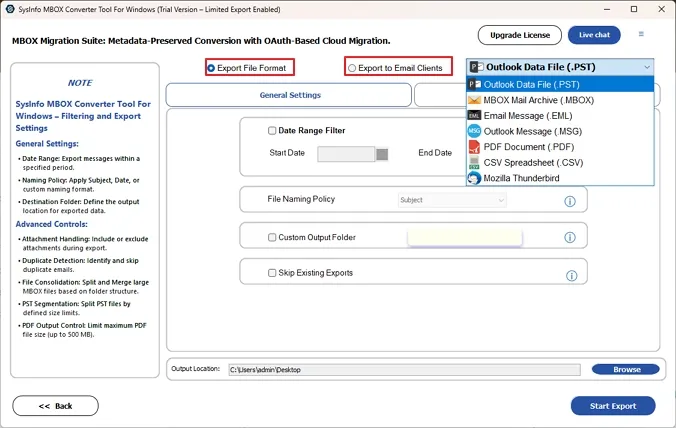
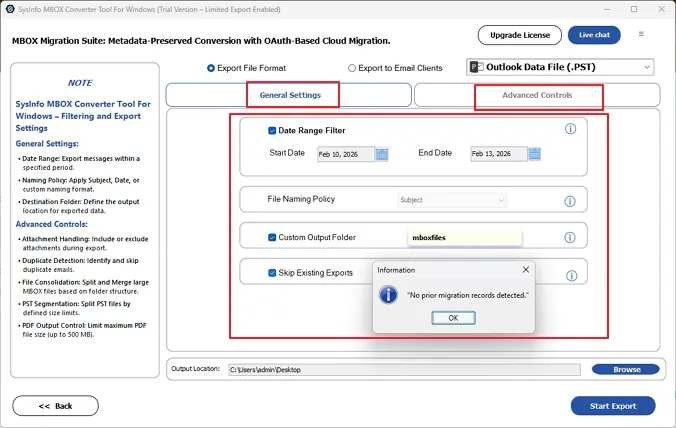
- Further, you can apply from the General Settings or Advanced Controls to make the process more specific.
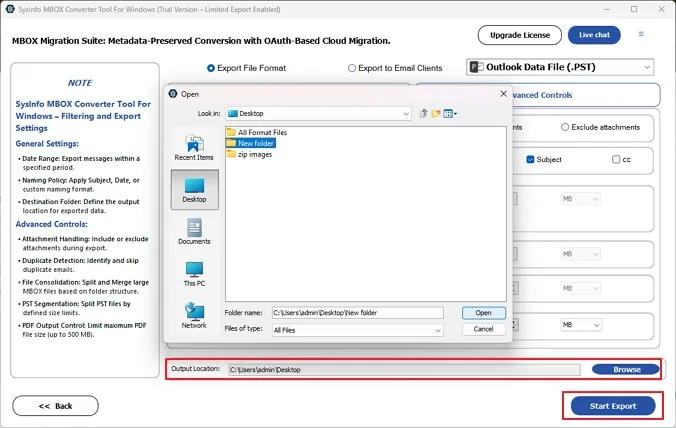
- In the end, specify the output location for the files and click on Start Export to complete the process.
What Makes MBOX Converter Tool the Enterprise Choice?
- Reads and saves MBOX files to multiple formats or email clients that no manual method can get into at once.
- Bulk recovery runs across multiple files at once without any file size cap applied.
- Every email thread, folder, and attachment comes out exactly the way it went in.
- Enterprises pick specific date ranges and recover only the business-critical emails they need.
- Identical emails get flagged and removed before recovery output is generated automatically.
- MBOX data exports directly into system files and offers users the ability to convert MBOX to DOC.
How to Protect MBOX Files From Future Corruption?
- Always exit the email client cleanly before any system shutdown or forced restart.
- Keep at least one off-site or cloud backup of all business-critical MBOX files always.
- Disk errors rarely announce themselves early, so run health checks before problems escalate.
- Real-time antivirus scanning on live MBOX directories causes more damage than it prevents.
- Large Thunderbird mailboxes that never get compacted are the first ones to break down.
- Maintain a backup with a dedicated software tool so that you can recover data immediately.
Final Words
No business should lose years of email history to a storage failure or sudden system crash. Manual repair paths are slow, error-prone, and completely ineffective on deeply corrupted MBOX files. The right way to fix corrupt MBOX file data is having a backup, which doesn’t let you be troubled. MailConverterTools MBOX Converter Tool saves MBOX emails and attachments with precision and zero data integrity compromise. Try the free demo and see exactly what proper MBOX recovery with a secure backup looks like today.
Frequently Asked Questions
Q.1 Is it possible to fix a corrupted MBOX file without losing any data?
Ans. The simplest fix for corrupted MBOX without data loss can be by having a backup of the same. You can take the backup by using the MailConverterTools MBOX Conversion Tool and ensure your data remains protected.
Q.2 Are there any free solutions to repair a damaged MBOX file?
Ans. Yes. Thunderbird’s built-in folder repair and compaction handle light corruption. These are the only solutions, but they don’t guarantee that your data is accurately secured and recovered.
Q.3 What are simple ways to fix an MBOX file that isn’t opening for non-technical users?
Ans. Non-technical users can try Thunderbird’s Repair Folder option first. For anything beyond that, they can keep a backup with the MailConverterTools MBOX Converter Tool, which requires zero technical expertise and saves files in just a few clicks.
About The Author:

Vikas Bajpai is a results-driven SEO expert and content strategist with a strong passion for building impactful digital experiences. He specializes in crafting data-backed content plans that boost visibility, engage audiences, and drive measurable growth. With deep expertise in search engine optimization, keyword strategy, and content marketing, Vikas helps brands strengthen their online presence and achieve long-term success.
Related Post